Real DPS deltas, real tree math, your actual build.
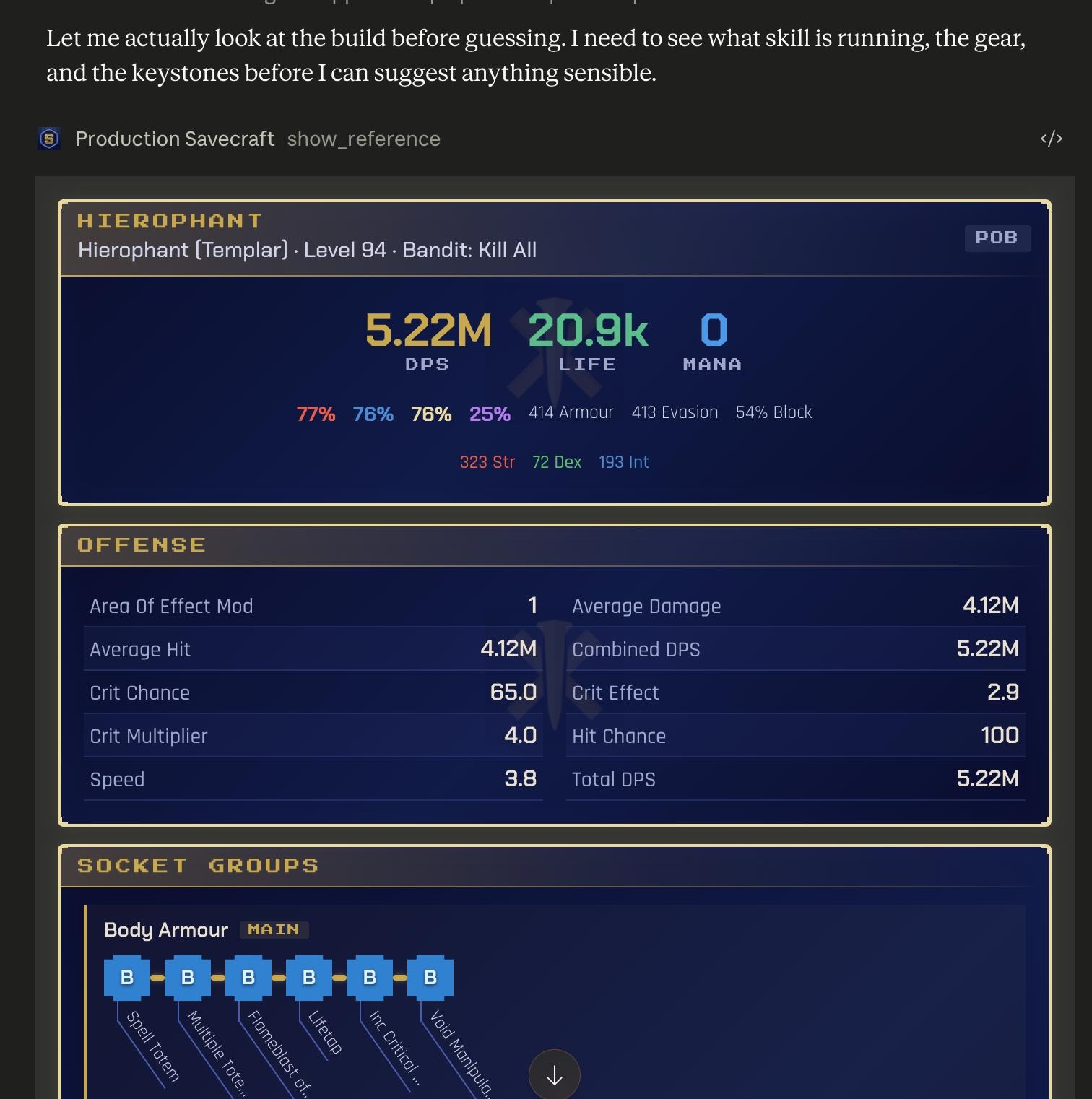
Savecraft is GGG-approved. Link your account or paste a pobb.in link, and your AI calls the real Path of Building calc engine on your build. Live poe.ninja prices come in too.
Answers in your language
- English
- Português
- Español
- Deutsch
- Français
- Polski
- Čeština
- Türkçe
- Русский
- 한국어
- 中文
- 日本語
Connect your account, or paste a link.
Savecraft is a GGG-approved connecting application. Every DPS number comes from Path of Building itself -- Savecraft ferries the build to the calc engine and the result back.
Real data for every build.
Every answer comes from PoB's calc engine, current RePoE data, and live poe.ninja prices.
Build Planner
NEEDS SAVEAnalyze, modify, or explore a Path of Exile build via Path of Building. First call returns a compact summary (DPS, life, resists, attributes), character info (class, ascendancy, bandit, pantheon), and a section_index listing available detail sections. The summary includes per-element damage breakdown (PhysicalHitAverage, FireHitAverage, ColdHitAverage, LightningHitAverage, ChaosHitAverage) showing the actual damage type split after all conversion and 'gain as extra' mechanics — check these BEFORE recommending element-specific gem or support changes. A skill tagged 'Fire' may deal significant chaos damage via gear conversion. The items section includes mod text for rare/magic items — use these to understand gear-based conversion, added-as-extra, and other build-defining mechanics. Unique item mods are not shown (use unique_search to look them up by name). Request sections='config' to see active configuration overrides (combat conditions, enemy settings, Wither stacks, etc.). To determine Low Life status, check config for conditionLowLife — do NOT rely on LifeUnreservedPercent, which reflects static reservations only, not combat-conditional effects like Dissolution of the Flesh. To drill deeper, call again with the buildId and sections parameter (e.g. sections='offense,defense'). Stat sections return curated key stats plus _extra_keys listing other available stats — use stat_keys to request specific extras. For modifications, pass buildId + operations. The response includes a changes object with {before, after, delta} for every summary stat that changed — present the delta to the player, not the full stat dump. For tree exploration, pass buildId + nearby_metrics to find the highest-impact nearby nodes ranked by real calc deltas. For tree pruning, pass buildId + audit_allocated to find weak branches in the CURRENT allocated tree — ranked by what the player would lose by removing them, with a dead_weight bucket of zero-contribution nodes. Pairs naturally with nearby_metrics: audit identifies underperforming branches, nearby finds replacement directions, you propose the swap. To drill into WHY a stat has its value (which item, tree node, skill, or pantheon contributes), pass mod_sources with the stat names. Stat names resolve case-insensitively, and each requested stat returns exactly one kind-discriminated object under data.statSources[statName]: kind=sources contains top-N modifier rows with source_type, source_name, mod_name, mod_type, value, and mod_row_key, plus truncated: {omitted_rows} when the row limit drops contributors; kind=unsupported_derived contains reason and decomposable_inputs; kind=unknown_stat contains reason and canonical when a case-insensitive match exists. Empty rows in kind=sources means genuinely no contributors. Decomposable stats (return kind=sources with real per-mod rows when contributors exist): Life, EnergyShield, Mana, Armour, Evasion, Strength, Dexterity, Intelligence, resistances, BlockChance, SpellSuppressionChance, LifeRegen, ManaRegen, CritChance, ailment-chance/effect stats, hit-damage component stats — anything stored as a mod against the player’s actor. Derived stats such as CombinedDPS, TotalDPS, FullDPS, AverageHit, Speed, EHP, and MaximumHitTaken variants return kind=breakdown or kind=attribution; kind=unsupported_derived applies only when the source-unit universe is empty. When a player asks why two builds diverge on a damage stat, request the listed decomposable_inputs (crit components, hit-damage adders, conversion mods, gear-source life-as-extra-mana, etc.), not the aggregate. Aggregate stats serve as quick "is this build behaving fundamentally differently?" tells, not as source-decomposable answers. After identifying the divergent mods, re-call compare with buy_similar=true and buy_similar_filters populated from those mods to find replacement gear. Use nearby_categories on a /resolve or /modify call to focus the inline power_report on a specific node type (e.g. nearby_categories=["Keystone"] when the player asks "any keystone I should grab?") — pair with audit_categories on a follow-up audit_allocated call to get symmetric remove/add suggestions confined to the same category axis. When narrating /compare gear diffs, filter to slots where modsSame is false — modsSame:true means no mechanical divergence even when nameSame:false (rare reroll, RELIC/UNIQUE foil flag), so those slots add noise without insight. Each compared socket group carries mainGemLinkCount (link count of the main gem's socket), hostItemMaxLink (largest link on the host item), and hostItemName — read these directly to answer "is this skill 6-linked?" instead of re-correlating with sections.gear.items by slot. diffs.tree.allocatedOnlyIn is an array indexed parallel to builds[]; failed builds get [] at their index — index by build position, not buildId. Config keys prefixed multiplier (e.g. multiplierRage, multiplierWitheredStackCount, multiplierFrenzyCharges) are user-set knobs the calc reads as inputs; the resulting runtime stats live in offense/defense (Rage, WitherEffect, FrenzyCharges) and may be cap-clamped against gear-derived maxima. Read the runtime stat in offense/defense for the post-calc effect — the config value is what was requested, not what's being applied. Every response includes a buildId for follow-up calls. Mastery candidates in nearby results and the inline power_report recommend individual selectable effects, not just mastery locations: each row carries id, effect_id, the mastery node's display name, and effect stat text, with a real calc delta for that effect. Duplicate locations collapse to the cheapest path. Pass a recommended row's id and effect_id directly to allocate_mastery.
Gem Search
INSTANTSearch Path of Exile skill and support gems by name, tags, or description. USE PROACTIVELY: query this module to verify gem names, check gem colors, look up support gem interactions, or find gems by keyword before referencing them in build advice. Prevents hallucinating gem names or wrong gem colors. Canonical source for gem names used by build_planner's swap_gem and add_gem operations — call this before those ops if you're unsure of an exact name. PoB canonical names OMIT the trailing ' Support' (e.g. 'Added Lightning Damage', not 'Added Lightning Damage Support'); build_planner handles the alias but naming them correctly avoids the round-trip. Support gems include: mana_multiplier (cost %), cannot_support_minions (boolean), minion_excluded_effects (stats that don't apply to minions/totems), require_skill_types and exclude_skill_types. stats_at_20 includes both constant and level-scaled effects (e.g. the actual 'more damage' multiplier). If the player has connected their Path of Exile account, build_planner can analyze their own character directly (character:'current' or a character name) — this module complements that connected-account workflow.
Passive Tree Search
INSTANTSearch Path of Exile passive tree nodes by name or stat description. USE PROACTIVELY: query this module to verify keystone effects, find notable locations, compare selectable mastery effects, or check ascendancy nodes before advising on tree pathing. Mastery rows render their selectable effects, and effect text is searchable through both full-text and semantic search. Supports filtering by type (keystone, notable, mastery, small) and ascendancy. If the player has connected their Path of Exile account, build_planner can analyze their own character directly (character:'current' or a character name) — this module complements that connected-account workflow.
Unique Item Search
INSTANTSearch Path of Exile unique items by name, base type, item class, or mod text. USE PROACTIVELY: query this module to verify unique item names, check exact mod values, or find uniques by keyword before referencing them in build advice. Prevents hallucinating unique names or wrong mod values. If the player has connected their Path of Exile account, build_planner can analyze their own character directly (character:'current' or a character name) — this module complements that connected-account workflow.
Economy Prices
INSTANTLook up current Path of Exile item prices from poe.ninja. USE PROACTIVELY: query this module when discussing item value, trade decisions, upgrade budgets, or farming strategies. Returns chaos and divine orb values, 7-day price trends, and listing confidence. If the player has connected their Path of Exile account, build_planner can analyze their own character directly (character:'current' or a character name) — this module complements that connected-account workflow.
Mod Search
INSTANTSearch Path of Exile item mods by effect text, with tier breakdowns. USE PROACTIVELY: query this module when advising on crafting to verify mod tier values, ilvl requirements, and which item classes a mod can appear on. Prevents hallucinating mod values or wrong tier ranges. Covers prefixes and suffixes. If the player has connected their Path of Exile account, build_planner can analyze their own character directly (character:'current' or a character name) — this module complements that connected-account workflow.
Essence Search
INSTANTLook up the guaranteed affix an Essence applies to each Path of Exile item class. USE PROACTIVELY for essence-crafting questions: query by exact essence name to compare all applicable item classes, or by item_class to compare every essence available for that class. Values are extracted from the pinned Path of Building data and prevent hallucinating essence outcomes.
Ground Truth
INSTANTVerified per-game facts with sources, served from the curated fact store; supersedes model training data. Query by text, topic, or fact_id; an empty query lists topics.
What changes
Stale memory. Ballpark numbers. No idea what your actual build looks like.
Real PoB calc on your actual build, with the cheaper alternative priced too.
Coaches your build at every stage
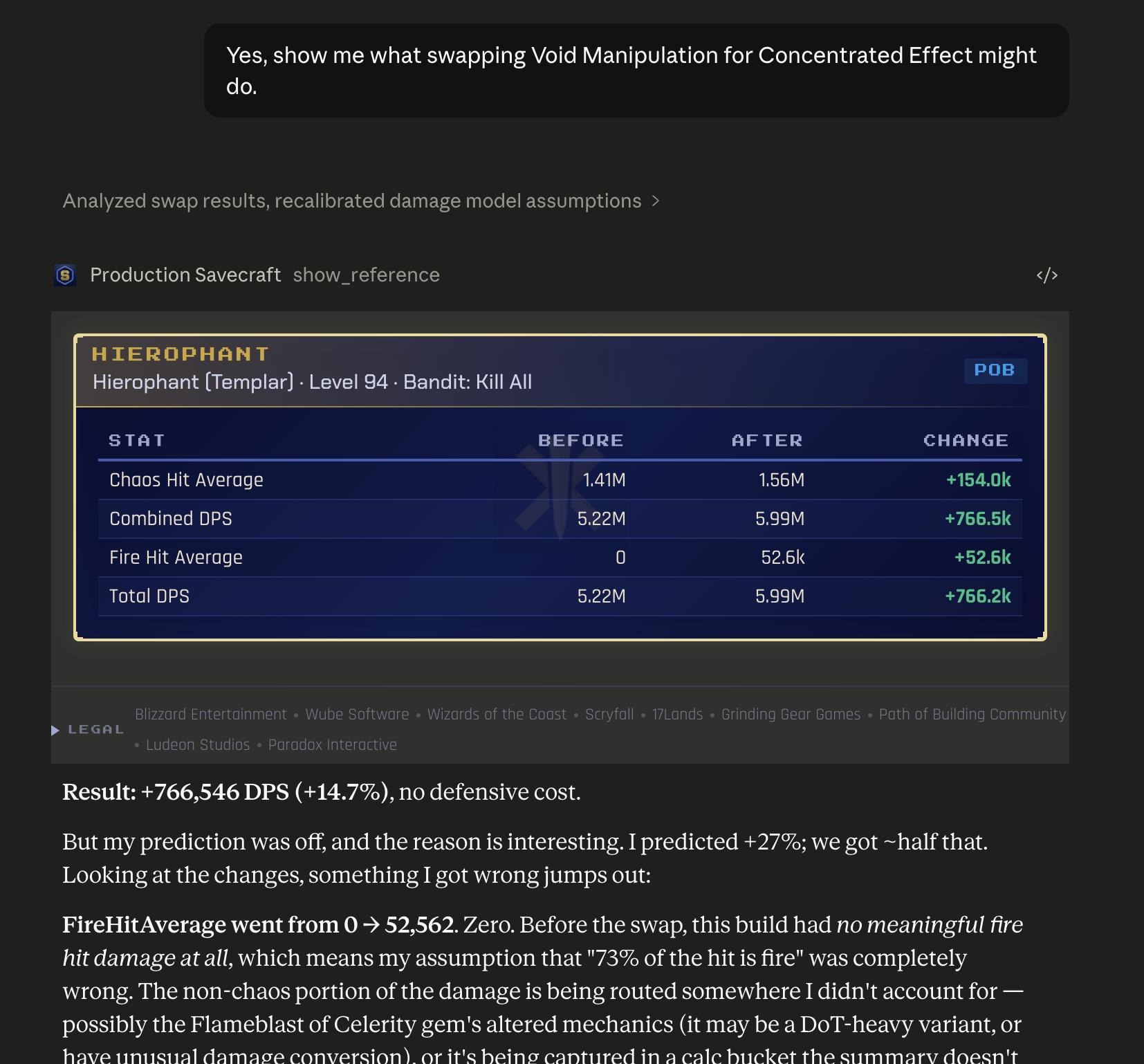
Gem swaps, tree audits, upgrade budgets -- each one runs the real calc.
Connect or paste. Get real answers.
Path of Exile is a server-side game. Connect your account and Savecraft reads your live characters straight from GGG -- or hand it a build link. Either way, the build runs through real Path of Building on our infrastructure.
Connect your account or paste a link
Connect once via GGG's official OAuth and every character is available by name -- or drop a pobb.in, pastebin, maxroll, poe.ninja, rentry, or poedb URL. Your AI calls the build_planner tool either way.
Savecraft runs real PoB
Our pob-server decodes the build, loads it into a LuaJIT process running Path of Building Community Fork, and returns DPS, life, resists, and a permanent buildId for follow-up calls.
Iterate in conversation
Ask your AI to swap a gem, change a passive, or scan the nearby tree for the biggest impact node. Each modification returns a new buildId, so you can branch hypotheses and compare results.
We show our work
The same sources serious PoE players already trust.
pob.savecraft.gg/{id}. Parent-child lineage tracks modifications, so you can branch hypotheses, compare, and share any state.Give your AI the real calc.
Works with Claude and ChatGPT. Connect your account or paste a link.